I often have clients ask for the ability to place testimonials on their site and developed this testimonials plugin in response that need. Testimonials is a plugin for managing testimonials placed on your WordPress site. It has full features and shortcode ability for display in posts, widgets, pages, and other areas of your site. The plugin also has several features that allow for customization of the display.
[tabs slidertype=”left tabs”]
[tabcontainer]
[tabtext]Install Testimonials[/tabtext]
[tabtext]Add Testimonial[/tabtext]
[tabtext]Edit Testimonials[/tabtext]
[tabtext]Delete Testimonials[/tabtext]
[tabtext]Shortcode Usage and Examples[/tabtext]
[tabtext]See it in Action[/tabtext]
[/tabcontainer]
[tabcontent]
[tab]
- Download the file
- Install using the plugins uploader or ftp the zip to your plugins directory in your WordPress installation and unzip it.
[/tab]
[tab]
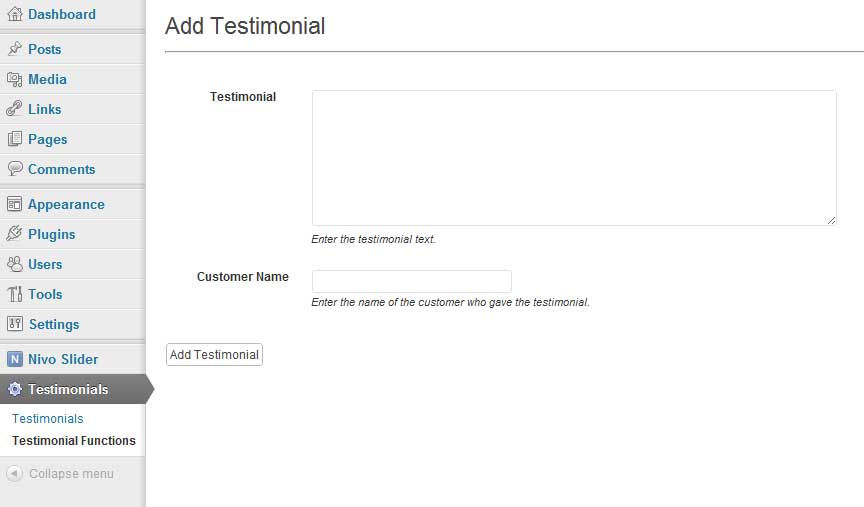
- Click the Testimonials menu item from within your WordPress Admin panel
- Click “Testimonials Functions”
- Enter your testimonial and the customer name.
- Click the “Add Testimonial” button
[/tab]
[tab]
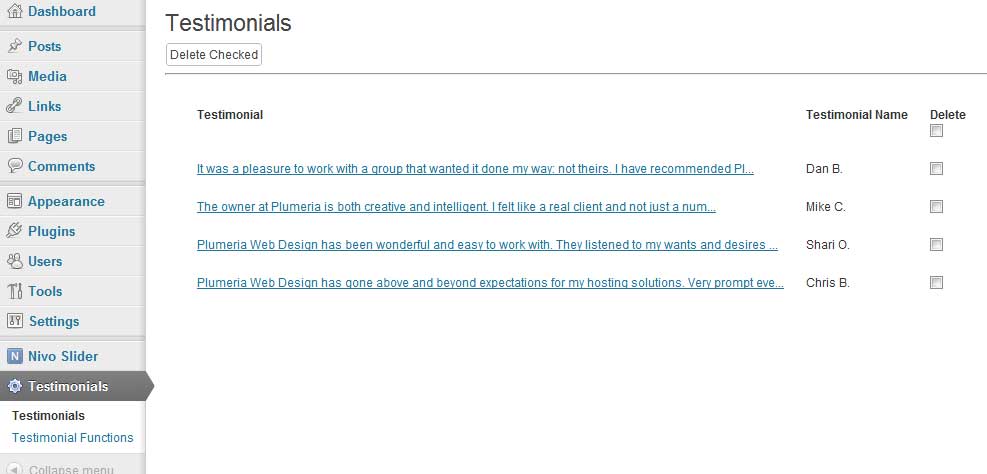
- Click the Testimonials menu item from within your WordPress Admin panel
- Click the Testimonials menu sub-item
- To edit an item, click the title and edit the text.
[/tab]
[tab]
- Click the Testimonials menu item from within your WordPress Admin panel
- Click the Testimonials menu sub-item
- From this screen you can delete testimonials if you wish, by clicking the checkbox next to the one you wish to delete. To delete them all, click the checkbox directly below the “Delete” header and then (for either option) click “Delete Checked”.
[/tab]
[tab]
To add testimonials to your posts, pages, or widgets use the following code:
[plumwd-testimonials]
To add the testimonials plugin to your WordPress theme use the following code inside your template:
echo do_shortcode('[plumwd-testimonials]');
The plugin also supports several attributes for the shortcode, below is a listing of the attributes and what their purpose is:
- size -> this allows you to limit the number of characters returned using the plugin. It will display the first nth number that you specify. Usage:
[plumwd-testimonials size="100"] - ending -> this allows you to specify an ending for your testimonial. This comes in handy when limiting the number of characters returned. Usage:
[plumwd-testimonials ending="..."] - num -> this allows you to limit the number of testimonials returned, leave blank to retrieve them all. Usage:
[plumwd-testimonials num="3"] - type -> allows you to specify how you want the list to be displayed. The available options are: list, para, span, div. By default testimonials will display as an unordered list. Usage:
[plumwd-testimonials type="list"] - class -> this allows you to apply a class to the item container so that you can apply custom styles. Usage:
[plumwd-testimonials class="test"] id -> this allows you to apply an id to the item container. Usage:
[plumwd-testimonials id="testimonials"]childclass -> this applies only to the list item. Setting childclass will place a class on the li element. Usage:
[plumwd-testimonials childclass="slides"]
[/tab]
[tab][nivoslider slug=”testimonials-plugin”][/tab]
[/tabcontent]
[/tabs]


Many thanks for this and apologies for this really stupid question but when you add a testimonial, where is it seen? I want them to go on a separate page so they can all go together. I really like the example in the quotation marks or have also seen a speech bubble effect. I have no coding experience so any help would be much appreciated.
Thank you
Julia
Hi Julia,
To display the testimonials you need to use the shortcode. To make a list you could just put
[plumwd-testimonials]. For the site that I used it with the quotes, I used jQuery to make the slides:The markup is something like this:
In your head tag put
[javascript]
<!– jQuery Testimonies –>
<script type="text/javascript">
jQuery(document).ready(function(){
jQuery(‘#testimonials .slide’);
setInterval(function(){
jQuery(‘#testimonials .slide’).filter(‘:visible’).fadeOut(7000,function(){
if(jQuery(this).next(‘li.slide’).size()){
jQuery(this).next().fadeIn(1000);
}
else{
jQuery(‘#testimonials .slide’).eq(0).fadeIn(1000);
}
});
},1000);
});
</script>
<!– END jQuery –>
[/javascript]
In your post or page:
[plumwd-testimonials size="100" ending="..." num="3" type="list" class="test" id="testimonials" childclass="slide"]i read your post, i just am still confused :-) where do i place the jquery code? i put it in the page itself and i didnt see it work
Hi Rafael,
The jQuery code should go into your template header just before the closing head tag. Can I see a link to what you’re trying to do?
http://marykole.com/?page_id=9
Just sent you an email.
yeah looks like im missing something i used the jquery you have a bit up in the header and the code you have for the testimonials a bit up there as well :-)
Im helping a friend with his site and wanted a rotating testimonial widget of plugin with short code and I used the jQuery code above in the header as well but it put all three testimonials on the area at the same time instead of rotating them in and out. Maybe Im not using the correct plugin but thought I would ask before I went looking for something else.
Thanks in advance,
Tim
Never mind. I decided to just keep a page for this purpose as the testimonials were longer than I had space for in the header.
Tim
The plugin doesn’t have a rotating script built in, but you could make it rotate if you wanted to. The plugin merely displays the testimonials. What you do with it is up to you.
The example I gave above is just one of the many ways to make it work.
How do you get the plugin to output the even & odd child classes like you did with the interior design firm shown in your “see it in action” section?
The even and odd classes as shown were done using an earlier version of the plugin that did not support shortcodes. I will update the plugin to make it easy to do odd/even styles.
Will you consider adding an input field to add a link to the reviewer’s website? I tried inserting the link directly into the “Customer Name” field — even tried escaping the quotes — but it breaks the code. Thanks for the plugin!
Hi Brandon,
That is an excellent suggestion. I’ll make the addition and push a change soon.
Elke, is there a way to place all the testimonials on a single page in the exact order they have been input? So that the display order is list or para or span in the same order that they were placed in…Thanks
Brian let me revisit the plugin to see what I can do about getting it to list the way you are suggesting.
Thanks!